
Agents
Automatic negotiation
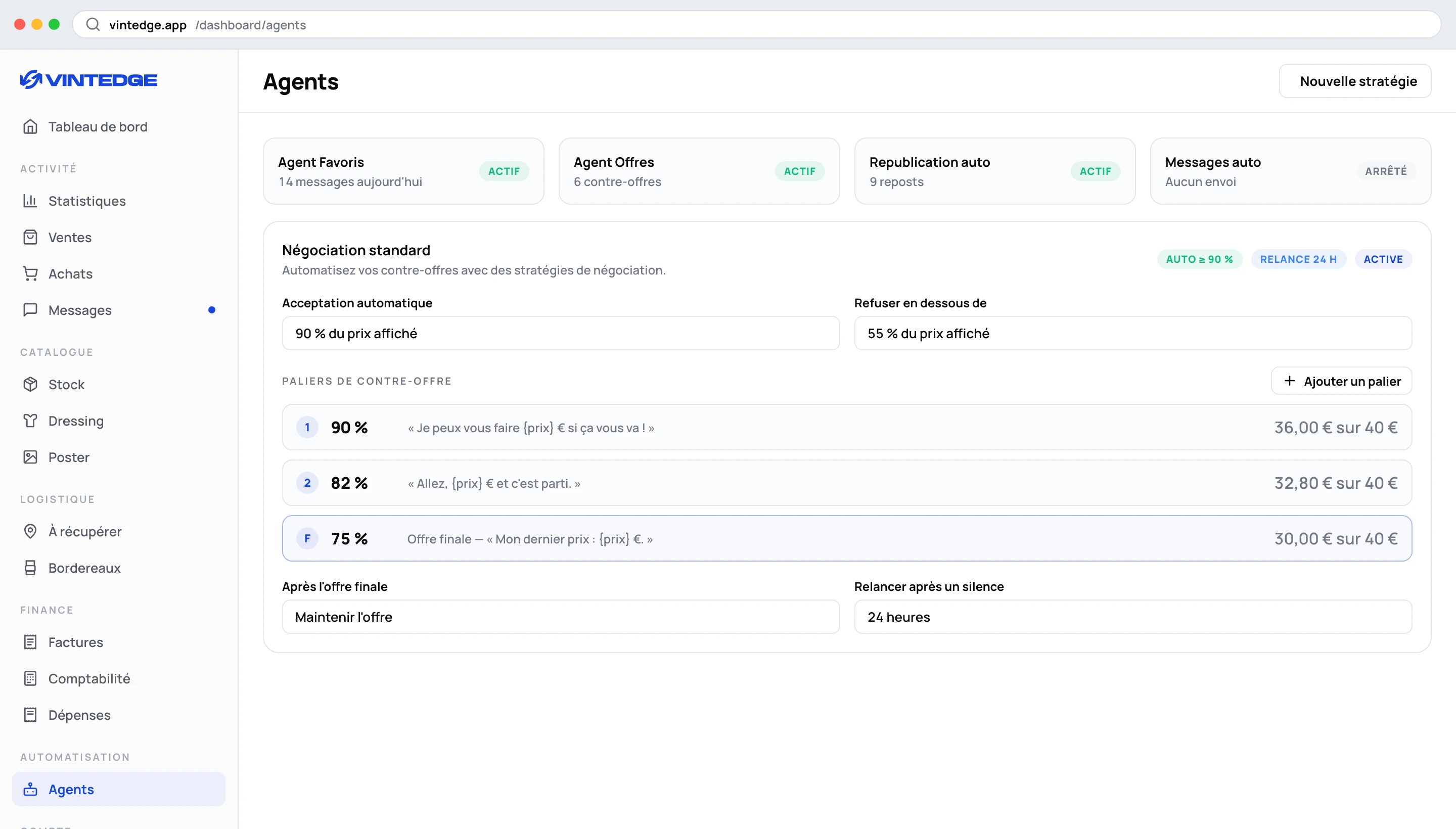
Negotiation is configured on the dashboard, on the Agents → Templates → Offers page. The extension simply carries it out.
If you look for offer settings in the extension, all you will find is a note: "Offers are now handled by your strategy on the dashboard." That is not a bug.
Why on the dashboard
A negotiation strategy has several steps, tiers, messages, and it deserves to be compared with another one. That calls for a real screen. The extension, for its part, is very good at sending a counter-offer at the right moment.
What a strategy contains
Automatic acceptance — above a certain percentage of the listed price, the offer is accepted without discussion. An offer at 92% of your price does not deserve three rounds.
Decline below — under a threshold, the offer is declined outright. That avoids countering a proposal at 20% of the price.
Counter-offer tiers — the heart of the strategy. Every time the buyer comes back, you propose a slightly lower price. Each tier can carry its own message.
Example on a €40 item:
| Step | Price offered | Message |
|---|---|---|
| Tier 1 | €36 | "I can do €36 if that works for you!" |
| Tier 2 | €33 | "Go on, €33 and it's yours." |
| Final offer | €30 | "My last price: €30." |
The tiers have to decrease, and the final offer must be lower than or equal to the last tier. The dashboard refuses to save an inconsistent strategy.
After the final offer — two behaviors: keep the offer (it stays valid, the buyer can come back to it) or decline.
Follow-up after silence — if the buyer does not reply within the delay you set, the offer is sent again. That is often what unblocks a forgotten negotiation.
Several strategies
You can create several and choose how they apply:
- Manual selection — a single active strategy.
- Weighted random — rotation according to weights, to compare what converts best.
How the extension carries it out
The dashboard decides, queues the order, and the extension carries it out on Vinted.
Two details that matter:
Counter-offers do not go out instantly. A delay is applied before sending, so that a server-driven reply does not look like a robot answering to the millisecond.
Vintedge checks that the offer is still possible before sending. If Vinted has closed the negotiation in the meantime, the order fails cleanly rather than producing an error the buyer can see.
And as with all dashboard commands: an order aimed at one Vinted account is never carried out from another.
Taking back control
At any moment, you can accept, decline or counter yourself, from the extension or from the dashboard inbox. The automation does not lock you in.
Setting your strategy well
Start from your margins, not from an abstract percentage. If your purchase price is filled in in the stock, the dashboard tells you the price below which you lose money. That is where your final offer belongs — never below.
Two tiers are enough. Five tiers drag the negotiation out and give the impression that the listed price is fictional.
Write the messages. A bare counter-offer is cold; a counter-offer with a sentence closes better.
Set automatic acceptance high (90% and above) at the start. You will lower it once you see how it goes.
Offers sent to favoriters
Not to be confused: the automatic offer after a favorites message is a setting of the Favorites agent, in the extension. It proposes a percentage of the price to someone who has just favorited an item. See Favorites.
The strategy described here concerns the offers you receive.