
Multiple Vinted accounts
Manage your Vinted accounts
On the dashboard, Vinted Accounts (left menu, Account section) is where you organize your shops.
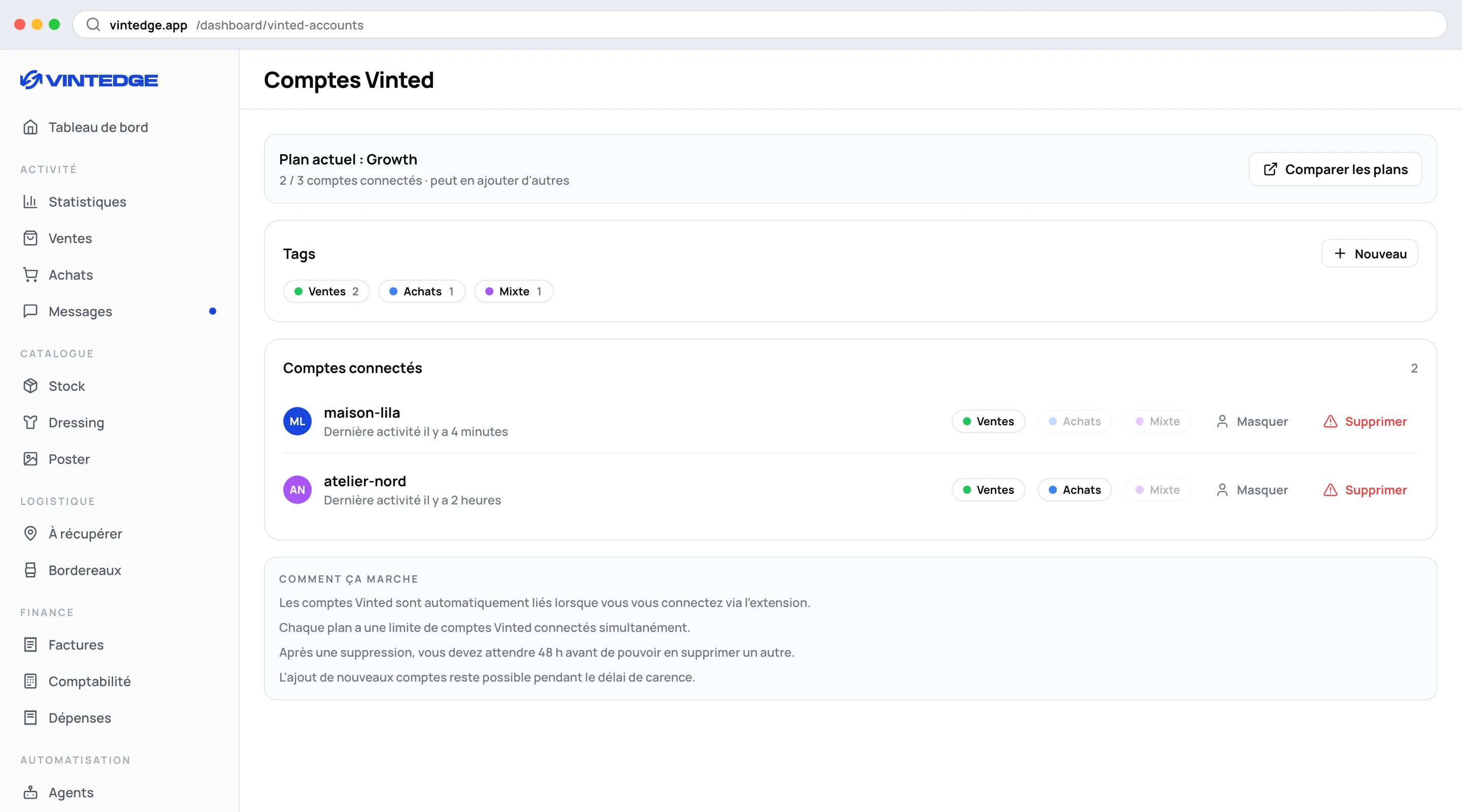
The header
It reminds you of your plan and your usage: Current plan: Growth — 2 / 3 accounts connected · can add more. On Elite, the limit is shown with the
infinity symbol.
Tags
A tag is a colored label you put on one or more accounts. Click New, pick a color, type a name, Enter.
Three tags are offered in one click if you do not have them yet: Sales (green), Purchases (blue), Mixed (purple).
To attach a tag to an account, just click its dot on the account's row: solid = assigned, pale = not assigned. Click again to remove it.
The benefit shows up immediately in the account selector: filtering on the "Sales" tag means seeing only your selling accounts, without ticking them one by one.
Hiding an account
The eye icon hides an account. A hidden account:
- disappears from the lists when you are in the "all accounts" view;
- no longer appears in global search results (⌘K);
- stays linked, still counts towards your plan limit, and its data stays intact.
It is meant for dormant accounts: the shop you no longer feed but whose history you want to keep.
Deleting an account
The bin icon unlinks the account. A confirmation appears:
You are about to delete the account "atelier-nord". After this deletion, you will not be able to delete another account for 48 h.
The 48-hour delay applies only to deletions. You can add new accounts during that window, within your plan's limit. The banner at the top of the page reminds you of the end date of the delay where relevant.
This safeguard exists to stop a subscription being run across far more accounts than intended, by chaining additions and deletions. Support cannot shorten it.
The account selector
In the dashboard's top bar, on every page that shows data, sits the account selector. It only appears if you have at least two accounts.
How it works deserves an explanation, because it is not the behavior of an ordinary list of checkboxes:
- "All accounts" means "no filter", not "everything ticked". In that state, the boxes are deliberately empty.
- From that state, clicking an account means "this one only" — not "all except this one".
- If you end up ticking everything, or unticking everything, the selector goes back to "all accounts" by itself. You never land on a randomly chosen account.
Beyond five accounts, a search field appears at the top of the menu (it searches the username and the Vinted ID).
Tags also appear in this menu: clicking a tag selects every account carrying it in one go. Several tags add up.
Your filter is remembered — on this device and on your account, it follows you from one browser to another. If a filtered account is deleted, it is removed from the filter automatically: an out-of-date selection cannot silently hide your lists.
What the filter changes
Every data page takes it into account: sales, purchases, stock, wardrobe, Poster, analytics, invoices, expenses, agents.
One useful detail: sales and purchases entered by hand (with no Vinted account) only appear when no specific account is filtered. That makes sense — they belong to no shop — but it is surprising the first time.