
Reposting
Repost settings
The settings open from Wardrobe → Settings, or automatically when you start a repost — in which case the window appears in confirmation mode, with the number of items involved.
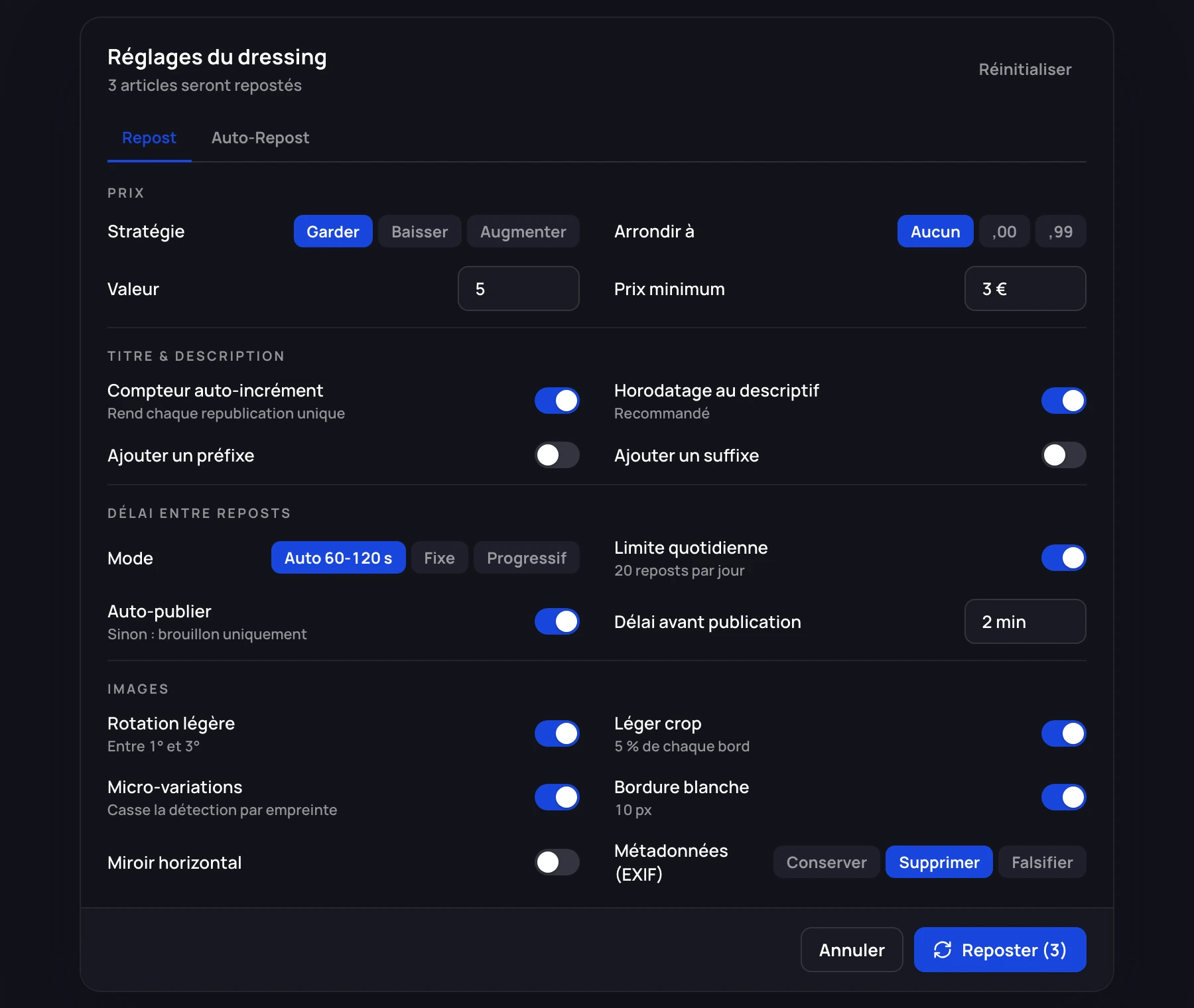
The double confirmation click is deliberate. If you change a setting before starting, the button becomes "Save and repost", then "Confirm? Repost" in red. Reposting fifty items with a bad price setting is expensive; two clicks beat one regret.
The Reset button restores all the factory values.
Price
| Option | Values | Default |
|---|---|---|
| Strategy | Keep · Decrease · Increase | Keep |
| Type | Fixed amount · Percentage | Fixed |
| Value | 5 | |
| Round to | None · .00 · .99 · .50 | None |
| Minimum price | €3 |
The minimum price is the most important safeguard in this window. With a 10% drop applied at every scheduled repost, an item ends up at an absurd price within a few weeks if no floor is set.
Title and description
| Option | Default |
|---|---|
| Add a prefix | Off |
| Add a suffix | Off |
| Auto-increment counter | On |
| Add a timestamp to the description | On |
The two options that are on by default serve the same purpose as the image transformations: making each republication different from the previous one. Leave them on.
Randomizing the title
A separate section lets you shuffle the order of the words in the title, while pinning certain elements to a precise position: brand, type, size, color, gender.
Example: you want the brand to stay as the first word (that is what people type), but the rest to vary. Set "Brand → Position 1" and leave the others on "Free".
Unique tag
Adds a short identifier at the end of the title, built from a prefix you choose and the item's characteristics (brand, category, gender, size). A preview shows the result.
It is useful for finding a physical item from a listing. If you already use the dashboard's SKUs, prefer those: they are linked to your stock.
Delays between reposts
| Option | Values | Default |
|---|---|---|
| Mode | Auto (60-120 s) · Fixed · Progressive | Auto |
| Fixed delay | 20 s | |
| Progressive — start / step / max | 15 s / 5 s / 60 s | |
| Daily limit | Off, 20 |
Keep Auto mode. A fixed delay produces a perfectly regular rhythm, which is precisely the signature of an automaton. Progressive mode lengthens the delay as the batch goes on, which is a good compromise on large volumes.
Turn on the daily limit as soon as you repost regularly. Once it is reached, reposts are refused until the next day, and a banner tells you so in the wardrobe.
Publishing mode
Publish automatically (default) — the listing is created then published, and the original is deleted. The delay before publishing (2 minutes by default) separates the creation of the draft from putting it online.
Draft only — the listing is created as a draft and is not published. You publish it from Vinted. It is the safest mode.
Keep original listing active — off by default, and to be left that way. See Why and when to repost.
What the repost copies over
Everything else is taken over identically from the original listing, without you having to think about it: brand, category, colors, condition, unisex, measurements, manufacturer, parcel format, domestic and international shipping costs, size, and the specific attributes (platform and classification for video games, ISBN for books).
A word on photo quality
If the item has a cloud backup, the photos are taken from that backup at original quality. Otherwise they are downloaded again from Vinted, which has already recompressed them.
On an item you will repost several times, the difference becomes visible after three or four passes. Create the backup on the very first repost — see The wardrobe.